On this page
On this page
The short answer
A soccer game day graphic shows both teams, the date, kick-off time and the venue, in your team colors with your logo. Follow it with a halftime score, a final and a player of the game.
The free MatchWeek maker makes them from what you type, with no sign-up. Pick Football as your sport and the wording and the score list follow.
What goes on it
- Both teams, with crests, and who is at home.
- The day, the date and kick-off time.
- The field or complex. At a tournament, the field number saves a dozen messages.
- The competition, small: league, cup or showcase, and the age group.
How the score is listed
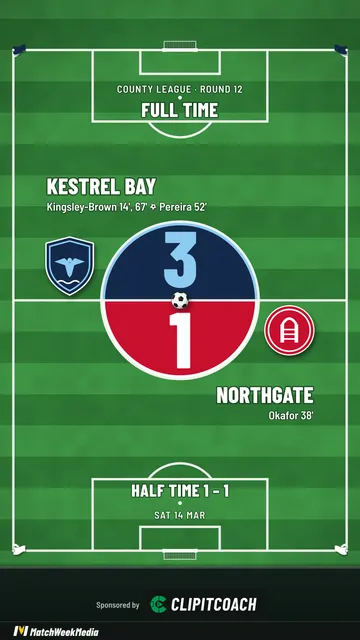
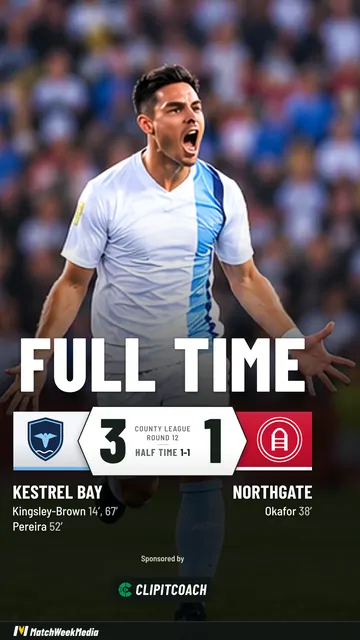
A soccer final lists goals with their minutes, the way a scoreline is written: Park 23', 78'. Own goals are marked as own goals.
Soccer also has a look of its own, Centre circle: a field from above with the score in the center circle. Every other look works too, including the ones over your own photo.
The week's posts
- Early in the week: the game day graphic, to the feed.
- Game morning: the same post as a Story.
- Halftime: the score and the first-half scorers.
- Final: the score and every scorer.
- Afterwards: player of the match, from a photo.
Outside North America these are matchday graphics; the fixture graphic guide is the same advice in those terms.
A note on names. The maker was built for clubs worldwide, so its post types are labelled Fixture, Half time, Full time and Award. A Fixture post is your game day graphic, and Full time is your final score.
Make one in a minute
- Open the maker and add your team once: name, colors and logo.
- Pick Football as your sport, then enter the opponent, the date and kick-off time.
- Choose the post: Fixture for game day, Half time, Full time for the final, or Award.
- Pick a look and choose Story or Post.
- Make it and save the picture.
Open the free maker No sign-up, no card. It runs in your browser.
Sizes that fit where you post
| Shape | Size | Use it for |
|---|---|---|
| Story | 1080 × 1920 (9:16) | Instagram and Facebook Stories, Reels, TikTok |
| Post | 1080 × 1350 (4:5) | The Instagram and Facebook feed |
Both download as PNG.
Game day graphics for every sport covers the others your program plays.
Common questions
How do I make a soccer game day graphic?
Open the free MatchWeek maker, add your team's name, colors and crest, pick Football as the sport (the maker uses the world name for soccer), and enter the opponent, the date and kick-off time. Choose the Fixture post, pick a look and save it as a Story or a feed post.
Can the final score show goalscorers and minutes?
Yes. Add each scorer and the minute, and they are listed under the score. Own goals are marked.
Is a game day graphic the same as a matchday graphic?
Yes. Matchday graphic is the usual term in the UK, Australia and New Zealand, and game day graphic in North America. They are the same posts.
Is it free, and is there a watermark?
It is free with no sign-up, no card and no limit on how many graphics you make. Your sponsor can appear on every free post. A slim MatchWeek banner runs along the bottom, and the MatchWeek app can remove it.