On this page
On this page
The short answer
The free matchday graphics maker has a new set of looks under With your photo: Score bar, Big score, Knockout, Headline, Caption, Frosted glass, Spot colour and Photo finish. Pick one, add a photo of the game, and the fixture, half-time or full-time post is drawn over it in your kit, as a Story or a Post.
It is still free with no sign-up, and the post is still drawn in your browser. Your photo is never uploaded, and the page doesn't keep it once you close it.
How to make one
- Open the matchday graphics maker and pick Fixture, Half time or Full time.
- Choose a look from With your photo, either on the wall of looks or in the maker's Look row.
- Fill in your team, who you're playing, the date and time, and the score, as for any other post.
- Under the looks, Your photo asks for the picture. Choose one, or on a computer drag it in. A JPEG, PNG or WebP works, at least 640 × 1024 pixels and up to 40 MB, and photos straight from an iPhone or an Android phone are fine.
- Drag the photo, or use the arrow keys, to choose what shows. The box shows it cropped the way your shape crops it, so check it again if you switch between Story and Post.
- Press Make my post, then download, copy or share the PNG.
Make one nowFree, no sign-up, drawn in your browser.
The photo looks
- Score bar — your photo full-bleed, a big result word and a score bar with both crests.
- Big score — your photo with the score set huge.
- Knockout — the score cut out of a sheet in your kit colour, your photo showing through.
- Headline — your photo under a slab in your kit colour.
- Caption — your photo with a clean caption card, like a press picture.
- Frosted glass — your photo, with the score on a pane of frosted glass.
- Spot colour — your photo in black and white, with your kit colour left in.
- Photo finish — your photo at the finish line, the score on the timing board.
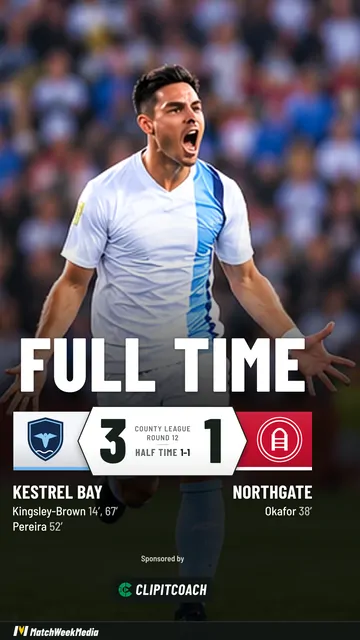
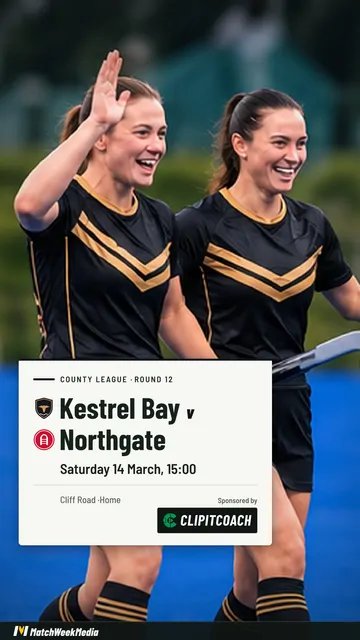
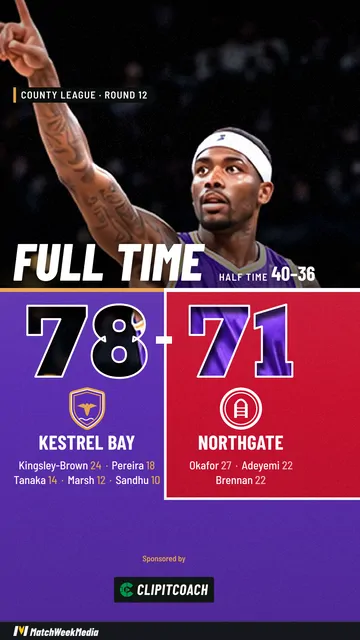
They work for every sport, and each comes in Story (1080 × 1920, for Reels, TikTok and Stories) and Post (1080 × 1350, for the feed). Each look checks how bright the photo is behind its words and darkens it, or sets the words on a plate, where they would be hard to read, so the score stays clear over a sunny sky or a white kit.
The rest of the maker works as before: your kit, your logo and theirs, the scorers on a result, and the other looks for when you don't have a photo to hand.
Your photo stays on your device
The maker draws every post in your browser, and the photo looks are no different. The photo is read, turned the right way up and sized on your phone or computer, and nothing about it is sent to us or anyone else.
It isn't saved either, not even in your browser: the maker remembers your team for next time, but a photo is gone once you close or reload the page. While the page is open, the same photo serves the game's fixture, half-time and full-time posts, and Next game, Remove or Forget my team drop it. The finished PNG carries no location or camera details from the photo.
Choosing a good photo
- Upright suits a Story. A landscape photo still works, but a Story shows only a slice of it.
- Bigger is sharper. A photo of at least 1080 × 1920 pixels stays sharp in a Story, and the maker tells you when yours may look soft.
- Leave room for the score. Most looks put the words in the lower half, so a photo with faces in the upper half works best. You can drag the photo to move them.
- Ask first. Only use photos the people in them are happy to share. For a youth team, settle with parents which photos can go online; player privacy and safeguarding covers how.
Video, and posts without the watermark
Free posts carry the watermark: ClipItCoach as the sponsor and a slim MatchWeekMedia bar along the bottom. The photo looks come from the MatchWeekMedia app, coming soon to Google Play and the App Store, which makes each post as a short video for Reels, TikTok and Stories, keeps your photos with each game, and can remove the watermark for good.
In ClipItCoach, the Coach plan's MatchWeekMedia tab makes the fixture, lineup, half-time and full-time posts from your schedule, in the looks that don't need a photo. The matchday posts guide goes through it.
Common questions
Is my photo uploaded anywhere?
No. The maker draws the post in your browser, so the photo stays on your phone or computer. It isn't saved in your browser either: it is gone once you close or reload the page.
What size should the photo be?
A JPEG, PNG or WebP of at least 640 × 1024 pixels, up to 40 MB. For a Story, a photo of 1080 × 1920 pixels or more stays sharpest, and the maker says when yours may look soft.
Can I use the same photo for the half-time and full-time posts?
Yes. While the page is open, the photo stays with the game, so switching between Fixture, Half time and Full time keeps it. Starting the next game clears it.
Can I make a photo post as a video?
Yes, with the MatchWeekMedia app, coming soon to Google Play and the App Store. It makes the same photo looks as a short video, and can remove the watermark.